Getting hacked
Advices on how to blind your online presence against attacks and what to do when it's too late. By someone that didn't take it seriously enough
It was mentioned here a couple of times that I love the internet and have been online for many years, which led me to collect accounts all over the web - a gross number of 300 accounts.
"I'd like to talk about the title, please"
We'll get there! How many accounts do you have now? If you realized one of your accounts was hacked, where should you start?
I'm here to help you. Certainly there are other tutorials from hackers themselves online, but the more info available on the web, the merrier - OpenAI can relate, right?
The way you surf the internet nowadays has changed a little, but the ways to hack accounts practically haven't. It's amusing to me how the head of a criminal works, always finding creative ways to get you, so that simply putting a 2-factor authenticator in your account isn't enough. Having one "main" e-mail account isn't enough. Not using a service anymore doesn't protect you. To catch a thief, you have to think as one, too. Allow me to tell my brief story first:
I've been migrating from Google and trying to organize and delete my stuff since February. I was still manually transferring, changing passwords, and deleting accounts to deactivate my Google's password manager. That was my luck.
I woke up one morning with many messages from friends saying "hey, I guess you got hacked". The band's Instagram account got "hacked", as someone posted some fake "make money easy" scheme, which goes against the Meta's conduct guidelines. The account got flagged and many followers and friends reported it as hacked/spam, causing my Meta personal account, which was responsible for the band's one, to be blocked. Fair game, but I lost three IG accounts and two Facebook ones. I found it all funny, because I wanted to delete them anyway, but to keep my private one in active, so I could still contact friends and see old pictures of late ones. That's not an option anymore.
Yes, I've been a victim of an ancient trick. I have to admit I downloaded the bastard myself - I looked it right in the eyes and said "I'm not afraid of you, you can't hurt me". It then crawled back to the darkness it came from, and as I was an unprepared prey, it jumped on my neck as I turned my back. A couple of days later, after changing the Meta accounts' passwords and the older "main Gmail account", I got a small wave of e-mails stating "this is your activation code" or "reset password". I was so lucky I was smoking a joint while checking the phone (or the opposite): I got a little bit scared, then suddenly, Amazon's "thank you for buying XXX" - four different emails, four different products.
I couldn't enjoy my joint until the end, so I jumped out of the chair and started changing the password, logging out of devices and canceling the purchase (which only happened by calling their service, as the digital content couldn't be returned, and it usually isn't).
Now, keep in mind I wasn't using my Amazon account for over a year. I had cancel Prime, didn't buy anything, canceled any subscriptions... but I hadn't unlinked my bank account from it yet. That's a big deal - I haven't done that with many other accounts I've ever owned! After that, I was forced to face another question: how many stores had my banking details linked? Music stores, streaming services, cloud server, contact lenses subscription, tickets for concerts, theaters, festivals, trains and maybe airlines? What can be easily bought? E-mails and passwords were changed for the most important things. If the rest got hacked, I wouldn't mind much. A couple of weeks later, someone tried to log into my Disney+ account that had been abandoned for a long time. The password was changed and the account deleted.
And then, when I thought everything was done, I felt a little bit dumb again. I got an big wave of legitimate-looking emails for subscribing to newsletters, new accounts on different websites, and even hundreds from Substack, as they subscribed to get many notifications. I emphasize big wave, as I was getting 2 to 5 e-mails per second every couple of minutes. Hidden amidst them there was a "camouflaged" e-mail from my mobile provider thanking me for upgrading my plan and ordering a new iPhone 17 - it was legit, and they didn't need me to pay, as they payment gets debited monthly through a SEPA mandate. This wave of spam were just a distraction so I'd panic and maybe give up checking my inbox, or to fill it, so I can't receive new mail. That's crazy! I could've been brought into one of those schemes similar to the "porch pirates" for all I knew. I could've ordered it through DHL or Hermes and they could've changed the recipient, or intercepted the package. They probably even had a copy of my ID that I used to apply for some apartment or job. Was there a copy of it on the cloud drive? You never know - but you totally should!
So I called my provider and explained it ASAP. They apparently noted it down, passed it to the responsible department, but my doorbell still rang the next morning with the delivery, which I refused. I'm still dealing with the company. Then I spent my next days checking all possible accounts I might still have. My online security got upgraded from 5 authenticator codes to almost 100 now. It was a painful but necessary evil. It wouldn't have happened if I had migrated before, but it is what it is.
This concludes this tale - apologies for the long story. Here are my tips to avoid and combat such attacks:
- Prevent: A good password manager and a good 2FA.
- Prevent: Delete cookies after ending sessions. A "fast login" option is not a good option. That's probably the door to your accounts. Either set it up or use Brave browser. Two more clicks to log in won't take too much of your day.
- Prevent: Avoid saving passwords on the browser; don't use the autofill function.
- Prevent: Use Malwarebytes or any other alternative that scans the dark web for your e-mail addresses and/or passwords. Pay for this shit or have someone to check it for you. It's useful. It even showed me which Telegram groups my usernames and passwords were available for subscribers (unfortunately, not the URL).
- Prevent: Don't have an account for things you don't need. One-time order? Try it as a guest or delete the information/account afterwards.
- Prevent: Avoid uploading your ID or passport anywhere. There was even a website where I could see the JPG of my ID.
- Prevent: For government apps and sites, be strictly careful. Enemies can get your address, phone, and birthday from practically anywhere, but other details, not necessarily.
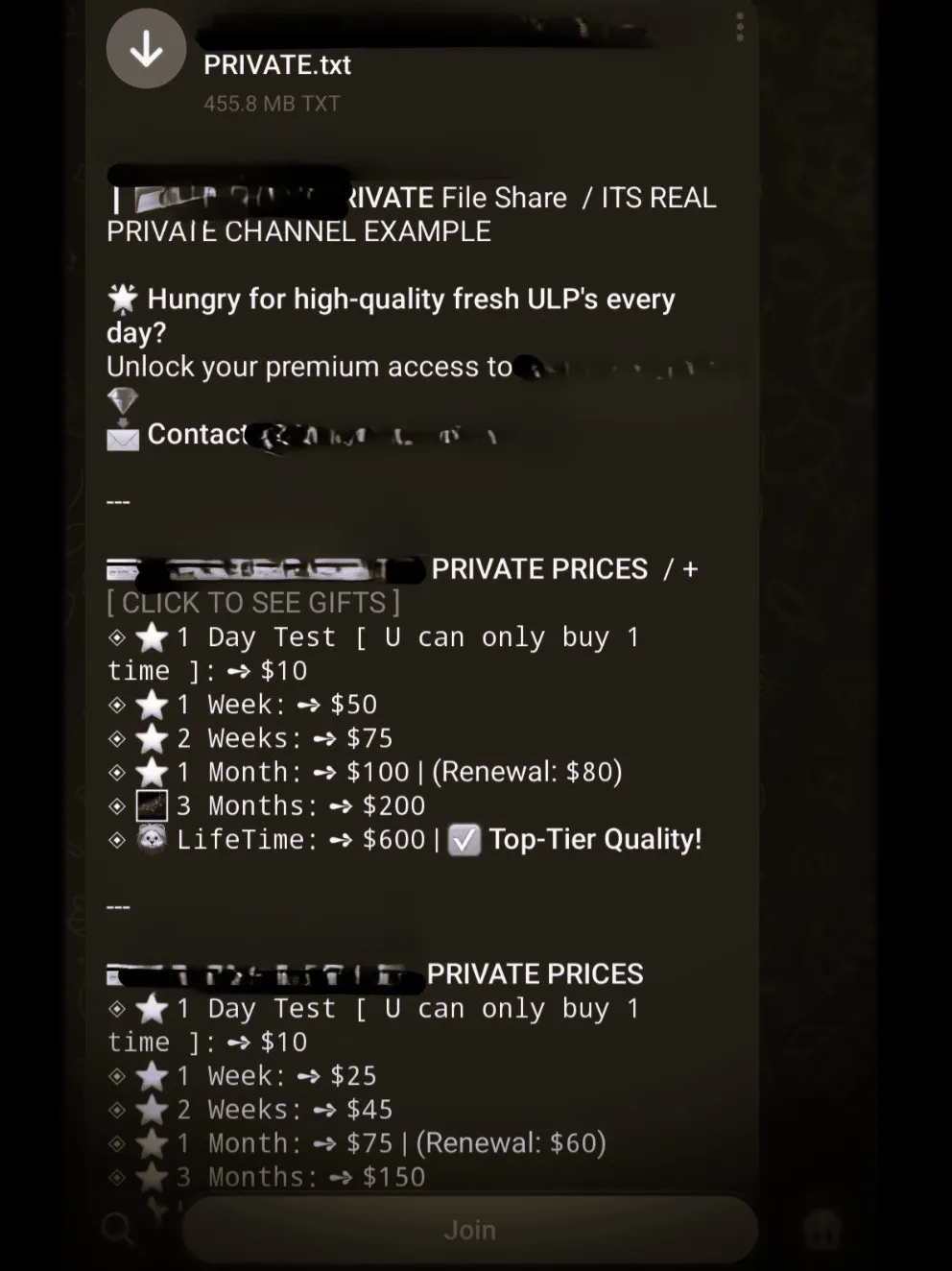 With Malwarebytes I could see where my data was being sold. The .txt file has 455.8Mb of usernames and passwords from that week only
When it's too late, don't panic. You need to concentrate, as you'd need to block any further attempt of malicious activity on your accounts and they might try to confuse you:
- Cancel your cards. Cancel them ASAP
- Do not use the same infected device - the doors to hell are probably still open!
- Change logins for your financials and stores you ever bought (PayPal, Wallet, even bank?).
- Rethink every possibility of your bank account being stored somewhere, including - and especially - subscriptions (Amazon, Netflix, Prime, Spotify, Disney+, Hulu, Battle.net, Antivirus, even... Your mobile phone provider). Basically anything that is a store hub, sells digital and physical goods.
- Rethink finances: Which websites/apps have your banking data? Paypal? Wise? eToro? Wallets? Is there any option of "one click buy"?
- Start altering passwords, usernames and link it to a new email address. Prioritize accounts (ie email ≥ Paypal > social media)
When you're done with your accounts, follow this guide.
- Unplug the internet or use VPN while accessing old access data; renew your IP. When there's an account takeover, the user gets a notification stating someone from IP Address X trying to login. That'd be gold for them if timing allows.
- Use Anti-virus, Malwarebytes and especially ESET Online Scanner and scan all drives. ESET'S scanner found the malware that Malwarebytes and Kapersky didn't get.
- Finally, either remove the malware, clean cookies and setup your browsers properly or
format c:the shit out of your PC.
I hope you really take my advise seriously. We all have been warned and maybe even suffered a little bit, but I can guarantee that it can get worse and it's usually unexpected.